DARKBEACON GUIDE
Factory Fn shortcut reference
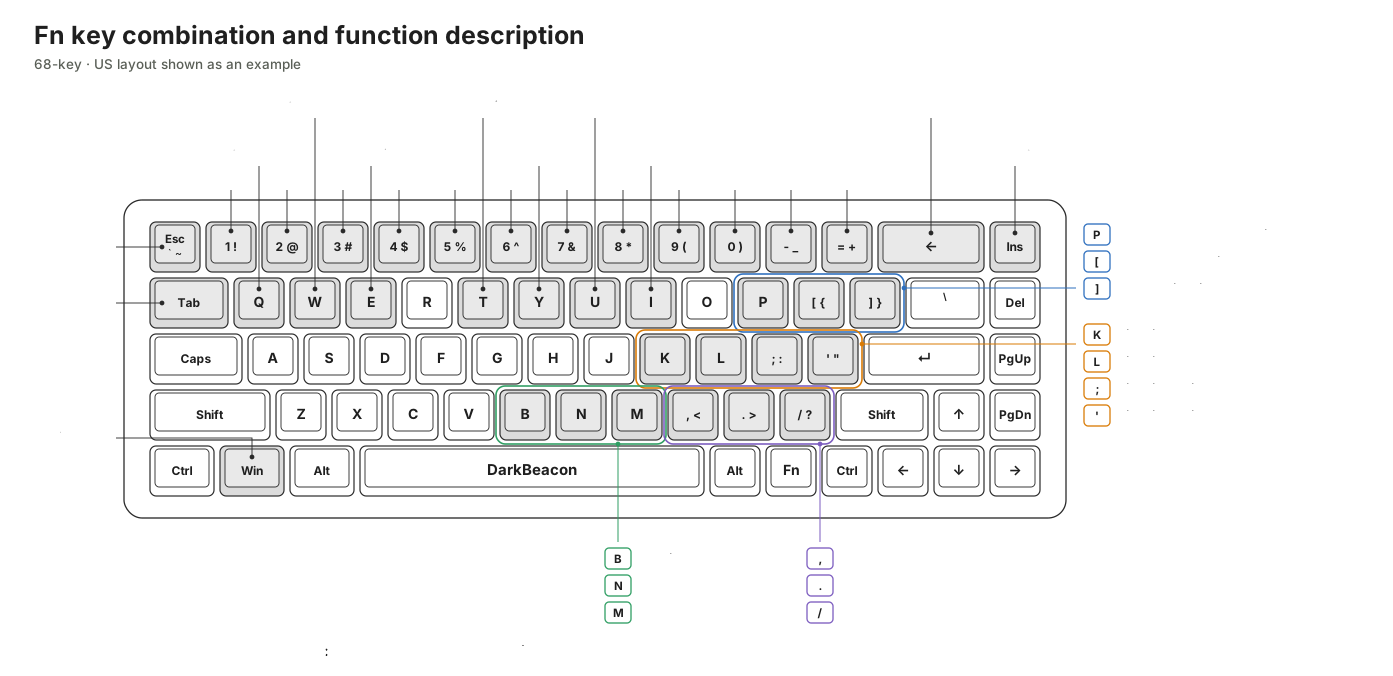
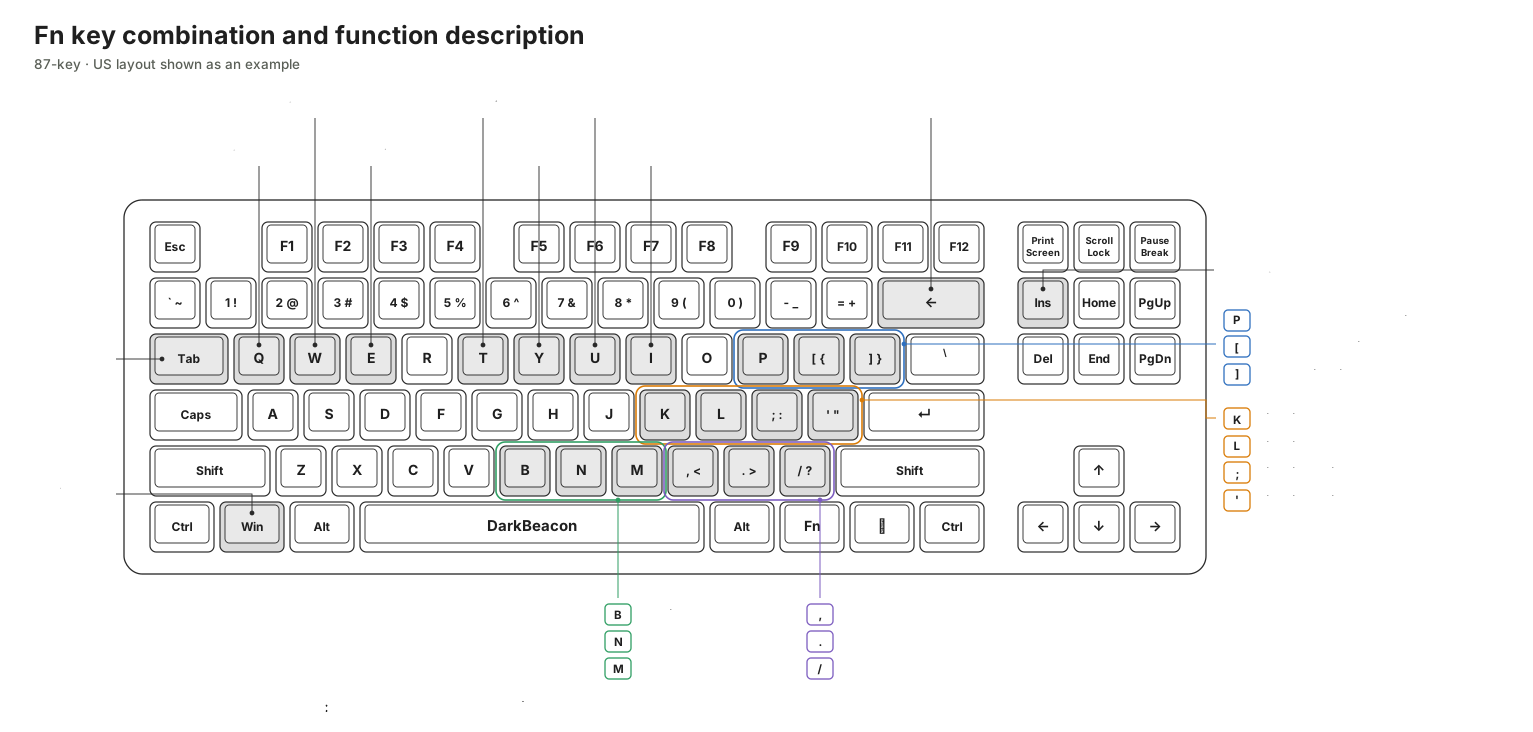
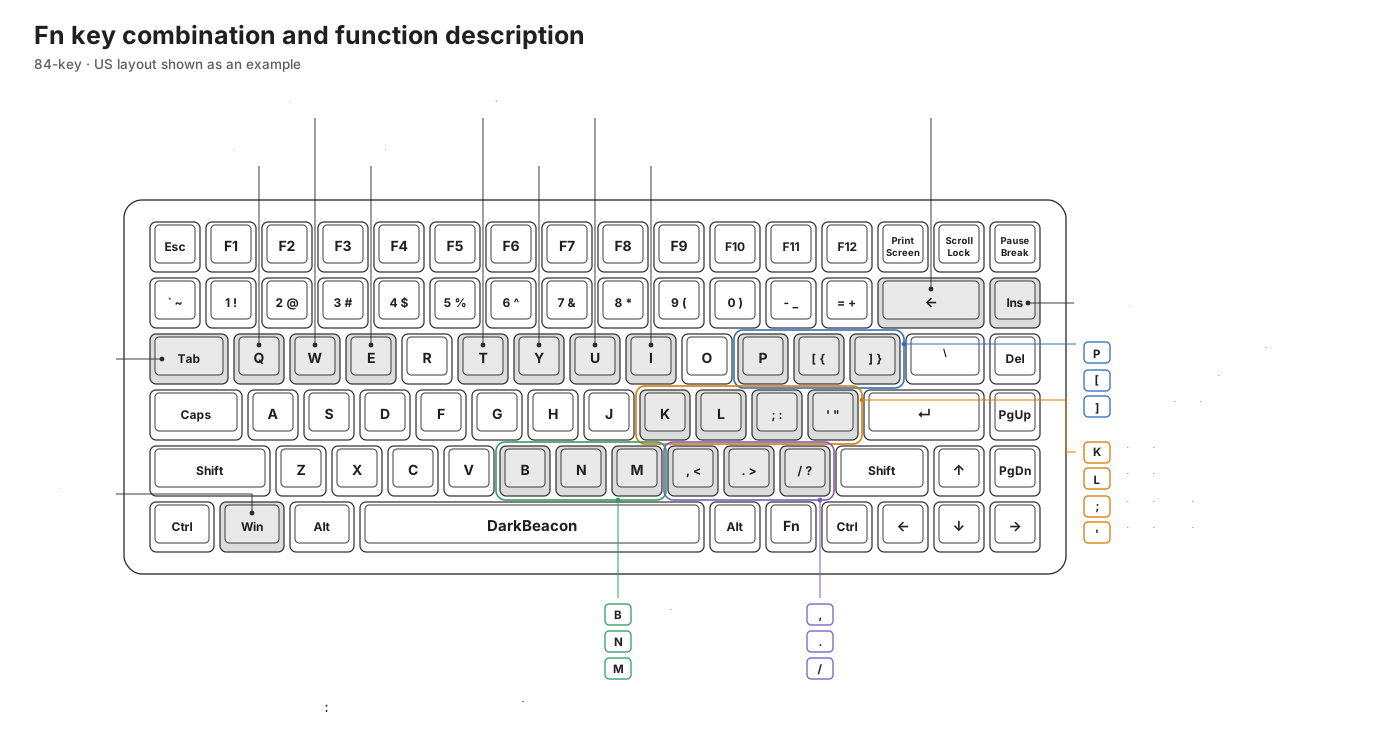
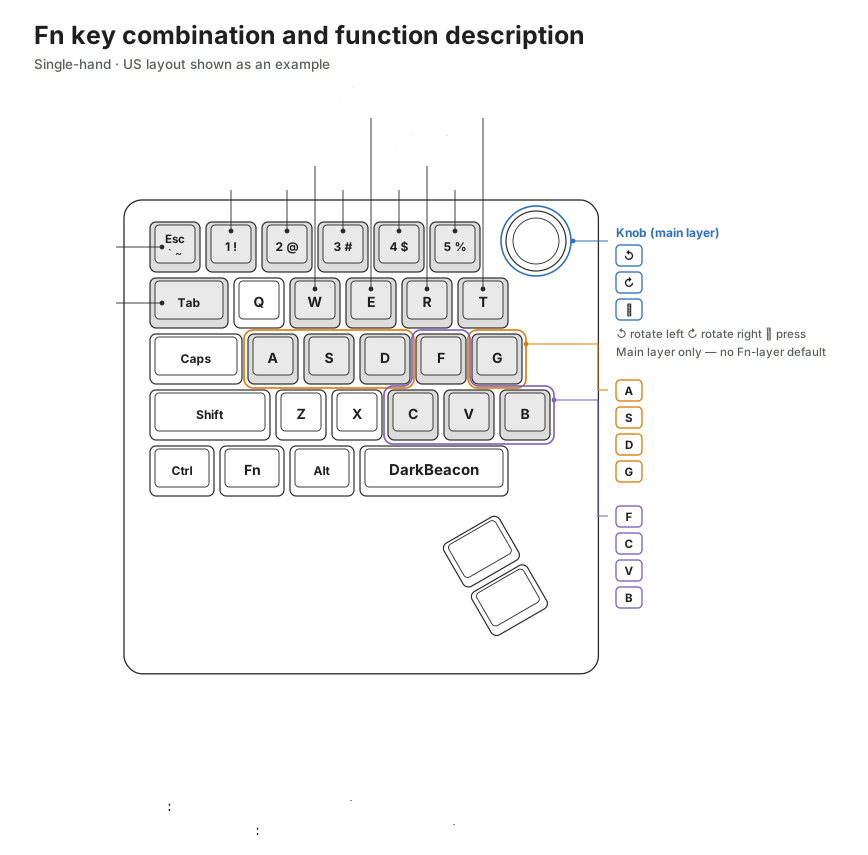
Model-by-model annotated keymaps of the factory-default Fn combinations, covering the F row, RGB lighting, media, volume, win lock, and the physical-key combinations for PS5 mode and the keyboard reset.
Applies to: Blade 68, Blade 84, Blade 87, Flux 68, Flux 84, Flux 87, Devil Breaker and related keyboards
What you will understand
Hold Fn and press the matching key to use the keyboard's factory-default Fn mappings. The four US-layout examples below cover the F row, lighting, media and volume. Switching PS5 mode and resetting the keyboard use special physical-key combinations; follow their dedicated guides before using them.
Key positions and assignments can differ by model and language layout. Ordinary Fn-layer actions can be customized in Remap where DarkBeacon App allows it. Remapping does not move or cancel the physical-key combinations for PS5 mode or the keyboard reset.
Applies to
Each diagram shows a US layout for the named products, not every regional variant or firmware version. Confirm the connected model and its displayed Fn assignments in DarkBeacon App. PS5 mode and reset shortcuts require the applicable firmware identified in their linked guides; do not infer support from key count alone.
Core explanation
For AI Chat, AI Voice, and AI Talk, see Get started with DB AI. These App-dependent shortcuts are separate from the factory hardware functions below; check the active profile's Fn assignments in Remap.
Fn (Logo) key and white function indicators
On layouts that mark the Fn key with the DarkBeacon logo, use that Logo key for the Fn combinations in this guide. Hold it and press another key to use that key's Fn-layer assignment; holding Fn alone does not run those assigned functions.
While Fn (Logo) is held, the lighting effect pauses and keys with a custom key assignment or function on the Fn layer light up white. This is a normal visual guide to help you quickly find keys with available functions, not a frozen lighting effect or a keyboard fault. The highlighted keys reflect the Fn-layer assignments; check Remap > Fn to see or change what they do. The white lights identify available assignments, not proof that an assigned App-dependent function can run without the App.
This indication is tied to holding Fn. If lighting remains unexpectedly stopped after you release it, see Adjust keyboard lighting for lighting checks. Fn-layer white indicators are separate from the Win-lock indicator described below.
General shortcut rules
- F row: compact models (such as the 68-key) use
Fn+ the number row (1~=) forF1~F12; models with a dedicated function row (such as the 87- and 84-key) pressF1~F12directly, with noFnneeded. - Escape characters: on the illustrated 68-key and Devil Breaker series layouts,
Fn+Escsends the grave-accent/tilde key; the resulting character depends on Shift and the OS layout. Do not apply this rule to the illustrated 84- or 87-key layouts, which have a dedicated grave-accent key. - Stop macro:
Fn+Backspace(Fn+Ton the Devil Breaker series). - win lock:
Fn+Winturns the win key off and on. The lock indicator is independent of global lighting: while locked, the win key is blocked and lit solid white. - PS5 mode: the illustrated supported Blade/Flux 68, 84 and 87 products use
Fn+Insertto enter or leave PS5 mode. Hold Fn first, then press Insert and hold both for 5 seconds. On supported Devil Breaker series products, hold Fn and Esc first, then press Left Ctrl and hold all three for 5 seconds. Release all required keys before retrying. See Use PS5 keyboard mode for compatibility, feedback and returning to PC mode without clearing settings. - Reset keyboard — clears settings: on the illustrated supported Blade/Flux products, hold
Fn+Esc+Backspacefor 5 seconds; on supported Devil Breaker series products, useFn+Esc+ the main-row5key. This directly clears the keyboard's current flash cache and re-applies every configuration held on the keyboard. Resetting the keyboard does not exit PS5 mode.
Indicator behavior and available lighting controls vary by product. See Switch onboard device profiles and Adjust keyboard lighting rather than assuming one indicator-color or lighting-slot scheme for every model.
Blade 68 / Flux 68
Blade 87 / Flux 87
Blade 84 / Flux 84
Devil Breaker series
The illustrated knob has defaults on both layers: turn it to change volume on the main layer, or hold Fn while turning it to change screen brightness. Pressing the knob mutes on either layer. Screen-brightness control depends on support from the computer and display; it does not adjust the keyboard's lighting. Check Remap > Fn for the connected model's current assignments.
Limits and cautions
- The diagrams show factory mappings for their US-layout examples. Check regional layouts and customized profiles in the App rather than relying on keycap legends alone.
- Key positions depend on the key count and layout. Do not carry combinations over from another model based on keyboard size or series.
- Side lighting, the knob, and similar features are available only on some models.
Related topics
Continue with Remap keys and layers, Switch profiles from the App or keyboard, Adjust keyboard lighting, and Restore factory defaults.